Plan Management Guide
Small Employer | 2026

Open Enrollment Period (OEP)
OEP happens once a year and should be scheduled one or two months before the group's renewal date. This allows for changes and member materials, such as ID cards, to be issued on time and for premium billing to be accurate. Coverage elected during the annual OEP will begin on the group’s renewal date.
The following may occur during the OEP:
- Add or remove employees and/or dependents
- Make changes to plans for current employees, such as switching from one plan to another
- Make changes to the plans that are offered to employees
New hires
New employees can be added to a group plan at any time. Enrollment can become effective for a new hire once they’ve completed their New Hire Waiting Period (NHWP). The employee has 31 days from their initial eligibility date to apply for coverage.
Late enrollment could result in the employee not being added to the plan.
The new employee’s effective date is the first day of the next calendar month following the end of the NHWP.
New Hire Date
0 Month
1 Month
2 Month
8/15/2026
9/1/2026
10/1/2026
11/1/2026
3/1/2026
3/1/2026
4/1/2026
5/1/2026
7/2/2026
8/1/2026
9/1/2026
9/30/2026
(so as not to exceed 90-day maximum)
New Hire Date
0 Month
30 Days
60 Days
7/2/2026
8/1/2026
8/1/2026
9/1/2026
11/1/2026
12/1/2026
1/1/2027
1/1/2027
Federal insurance regulations allow no more than a two-month waiting period not exceeding 90 days. This means an employee hired on the first of the month with a two-month NHWP would need to be enrolled on day 90, not day 91.
Reinstatements
If an employee has been rehired within 30 days of their termination date, we will reinstate their coverage. The employee would retain the same plan and ID number with no break in coverage.
Rehires
If an employee has been rehired more than 30 days but less than 13 weeks after their termination date, the employer can re-enroll them on the plan and waive the NHWP. Please keep in mind:
- If the waiting period is waived for one rehire, it needs to be waived for all rehires
- Anyone rehired after leaving the company for more than 13 weeks will have to meet the NHWP before their coverage will begin
- Rehires are permitted to add/remove dependents and make benefit changes when re-enrolled
- The rehire date is also the employee coverage eligibility date
Select Health Link
Link is a seamless way for employers to manage group enrollment and billing. Employers can:
- Manage the open enrollment process
- Manage group enrollment (new hires, etc.) year-round
- Manage billing
- Order and download member ID cards
Additional information about Link can be found on the Link Resources tab of this guide.
Options for submitting enrollment information
- Link is the easiest, most accurate method for submitting and maintaining benefit information. Contact your agent to gain access to Link.
- If needed, Enrollment Forms or changes can be emailed to the appointed agent or sent directly to Enrollment at smallgroupenrollment@selecthealth.org.
When emailing Enrollment Forms or other documents containing Protected Health Information (PHI), make sure they are sent through our secure email system.
ID cards
Once enrollment is complete, each employee is issued a subscriber ID and ID cards are ordered. Cards are also available to group plan managers through Link. ID cards are mailed to the member’s mailing address on file. While only the subscriber’s name is printed on the card, it can be used by any covered family member.
The subscriber and the dependent(s) receive cards for Nevada groups.
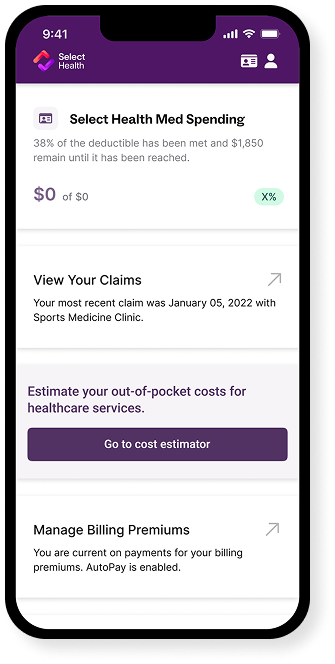
Select Health account
As soon as coverage begins, members should visit selecthealth.org and use their subscriber ID to set up their member account. Accounts can be used to:
- Check coverage and claims
- See year-to-date totals such as deductible and out-of-pocket max
- Find lower-cost medications
- View and print ID cards
- Send secure messages
- Request a call back from or chat with Member Services
- Access the Wellness Rewards program
Members can also download the mobile app to view their ID cards, chat with us, and more.